Can MS Excel help finance students to excel? A study in student work readiness
Abstract
Microsoft Excel is vital in the finance sector, and preparing students for the professional arena involves honing their spreadsheet skills. A study investigated the efficacy of a finance-centric Microsoft Excel workshop as an intervention to enhance students' skills and readiness for work. Pre- and post-intervention tests assessed students' perceptions and abilities. The results revealed a significant improvement across basic, intermediate, and advanced Excel skills, positively impacting students' self-perceptions. The majority recognized Excel as a critical job market skill. The study recommends integrating Excel assignments into finance modules to elevate skills and enhance finance knowledge retention, promoting self-directed learning.
Excel; spreadsheet; self-efficacy; work readiness; finance
INTRODUCTION
Proficiency in information and communication technologies and overall computer literacy are crucial in today's competitive job market (Grant, Malloy, and Murphy, 2009; Tickle, Kyng, and Wood, 2014; Daff, 2021). Word processing and effective spreadsheet usage are fundamental requirements for office jobs worldwide (Zhang, 2014). In the US, a significant percentage of entry-level and middle-skilled job openings necessitate at least basic proficiency in productivity software like Microsoft Office Excel (hereafter MS Excel) (Burning Glass Technologies, 2015; Formby, Medlin, and Ellington, 2017). This requirement extends globally, impacting both developed and developing countries (Doe, et al., 2016).
Finance and accounting professionals, in particular, must continually update their computer skills due to the evolving work environment (Wessels, 2007; Quinto and Emmanuel, 2022). While advanced skills like coding macros may be less common, basic to intermediate MS Excel skills are deemed essential for success in finance teams (Balik, 2009; Spraakman, et al., 2015). Many organizations use Excel extensively, making proficiency in Excel a fundamental starting point for MAs (Schmidt, Riley, and Swanson Church, 2020). Spreadsheet proficiency, especially with MS Excel, is consistently ranked as vital by professionals in both public and private sectors (Cory and Pruske, 2012; Doe, et al., 2016). Therefore, guiding students to practice these skills using software like MS Excel is imperative for their preparation for the workforce.
While a well-rounded education is vital for fostering active and engaged citizens, universities also have a role in preparing graduates for the workforce. Studies show that proficiency in MS Excel, a valuable tool for critical thinking and data analysis, remains a gap in graduating students' skill sets (Ramachandran and Ragland, 2016). Integrating MS Excel skills into the curriculum can bridge this gap without compromising the broader educational goals. Employers consistently report inadequate spreadsheet skills in graduates (Cory and Pruske, 2012; Aryanti and Adhariani, 2020). Surprisingly, final-year students often overestimate their spreadsheet skills, realizing the gap only after employment (Yu, Churyk, and Chang, 2013; Ragland and Ramachandran, 2014). Despite some MS Excel training, both graduates and employers agree on the need for enhanced proficiency through formal instruction (Ramachandran and Ragland, 2016; Tickle et al., 2014).
The question arises as to how finance students should be trained to reach a proficient level of MS Excel skills. In this article, we discuss an attempt to address the lack of skills of enrolled students through an intervention, namely a separate MS Excel workshop. This study investigated the effect of the intervention on students' actual and perceived MS Excel skills. The intervention aimed to improve finance students' MS Excel skills, with specific reference to more advanced financial applications, to improve finance students' employability and transition into the workplace after graduation. Public accounting firms highly value accounting graduates with strong MS Excel proficiency (Ragland and Ramachandran, 2014; Formby, Medlin, and Ellington, 2017; Aryanti and Adhariani, 2020). We use the findings of the study to make suggestions on how to improve future courses to increase the MS Excel proficiency of students before they graduate. While our two-day workshop provided valuable insights, a onetime intervention may not be sufficient for long-term MS Excel proficiency. Our findings suggest the need for a more integrated approach, where MS Excel skills are progressively developed throughout the curriculum to ensure retention of skills. This would equip students with a stronger foundation before graduation, eliminating the reliance on separate, intensive interventions.
Research on MS Excel integration is of paramount importance for educators worldwide. As MS Excel proficiency is universally critical in professional settings, the findings of this study, grounded in a South African context, offer valuable insights applicable to diverse global educational environments. The emphasis on progressive integration and the application of social cognitive theory presents a universally relevant framework for educators seeking effective strategies to enhance students' MS Excel skills, ensuring their preparedness for the demands of the modern workplace on an international scale. This is also of import for other advanced business intelligence and analytics applications, as new technologies are continuously being developed (Diamant, 2023).
MS Excel training
Students value a combination of various types of activities in lectures and workshops, especially where the use of software is integrated and aligned with the requirements of the course. Innovations like software integration with theoretical courses are strongly associated with increased engagement. Student engagement is shown to be a predictor of personal development and learning and is strongly associated with improved levels of attainment of newly learned skills (Carini, et al., 2006; McCann and Russon, 2019).
McCann and Russon (2019) found that to stimulate effective deep learning, students first need an appropriate threshold knowledge of the subject field. For example, solving complex finance problems in Microsoft MS Excel will not stimulate deeper learning if the students have not yet mastered the basic concepts of finance. Once the basic finance concepts have been mastered, MS Excel can enable deeper learning, and the development of problem-solving skills, by removing mundane repetitive calculations (Cory and Pruske, 2012; MacDougall and Follows, 2006; Tickle, et al., 2014). The technology could thus be the catalyst for cognitive processes that enhance learning (McKnight, et al., 2016).
However, students also need training in the basic use of software before it is integrated with more complex subject-specific problems. Balik (2009), MacDougall and Follows (2006), as well as Bailey and Ragland (2022), suggest that MS Excel model-building should be used as part of the pedagogy of finance courses. They propose that students should progressively build an MS Excel spreadsheet that could perform repetitive calculations, enabling the students to focus on the interpretations of the output. Although these researchers found this method useful to teach finance knowledge with spreadsheet skills being a secondary benefit, students felt that their lack of MS Excel skills handicapped them during the course. If students received basic software training before taking the finance course, the lack of MS Excel skills would not have hindered their integrated finance knowledge development.
McCann and Russon (2019) later concluded that students need threshold knowledge of a subject field, as well as basic software skills before they can be given integrated problems solving complex subject-related problems using software applications. Students who complete a standalone MS Excel course are better able to focus on the finance concepts in complex MS Excel-based problems (MacDougall, and Follows, 2006). Upon integration of the subject and software, students must still be guided in which features to use, when to use them, and why the features should be used for a specific financial problem (Balik, 2009). However, time spent on software training should not replace teaching time for the course content (Davis, 1999). For the training to be effective, there has to be a balance between a mix of lectures, assignments, and integration with software. McCann and Russon (2019) found that not only do students value a mix of instruction and activities, but it increases engagement with the content, which is associated with increased attainment of skills and knowledge.
Since MS Excel has more complicated and powerful functions than word processing software, it requires repeated and applied use to retain skills (Grant, et al., 2009). Both Doe, et al. (2016) and Grant et.al. (2009) found that students who received MS Excel training were not proficient in the use and application of spreadsheets after the course. The main reason seems to be that the students were not required to use the training in their accounting and finance courses, so there was not adequate opportunity to apply the training they received to embed the skills and equip them for the world of work.
Integrating finance courses with the use of spreadsheets improves the development of critical thinking, critical awareness, and critical analysis (Slayter and Higgins, 2018). These problem-solving abilities are developed in addition to a more thorough finance understanding and development of finance skills. Students are then also more likely to re-use the skills learned during the course and continue to use spreadsheets in other courses (MacDougall and Follows, 2006). Universities should not only teach MS Excel but integrate more practice-driven MS Excel components into business and finance modules as part of curriculum improvement (Balik, 2009; Doe et.al., 2016; Zhang, 2014). This should equip students with the MS Excel skills they will need to be successful in the job market (Zhang, 2014).
The use of technology in pedagogy transforms teachers' roles as educators (McKnight, et al., 2016; Hermawan, Achmad, and Yulianah, 2022). When MS Excel is integrated into a finance course at a complex level, the course instructor and assistants should have advanced MS Excel skills. Davis (1999) found that students require support with the software, therefore instructors should have the ability to successfully troubleshoot the students' MS Excel problems and be able to assess the students' MS Excel skills at the end of the course. Development of course material that integrates MS Excel and grading of spreadsheet-based assessments are quite labour-intensive (MacDougall, and Follows, 2006) and the lack of required skills and the increased workload may be some of the reasons why MS Excel is not integrated into courses. However, academics agree that it is essential.
Self-competence and Self-efficacy
Self-competence or perceived competence is a person's belief in the abilities they possess, whereas self-efficacity is the person's belief in what they can achieve with those abilities (Bandura, 1981). According to Bandura (2010), the best way to instil a strong sense of self-efficacy is through experiences of mastery where participants do the task themselves. Training through demonstration and teaching (referred to as behavioural modelling and verbal guidance) can be used alongside experiences of mastery to help shape self-efficacy (Hardin, et al., 2014). If a person experiences frequent success in the development of competencies, a robust belief of efficacy will be formed. This in turn will play a central role in self-motivation and how much effort a person will invest to master challenges (Bandura, 1981; Bandura, 2010).
Self-efficacy can be applied to general tasks or specific subject areas, such as the use of a specific software like MS Excel (Bandura, 2010; Moos, and Azevedo, 2009). There is a positive association between high computer anxiety and low computer self-efficacy. The same relationship exists between spreadsheet anxiety and spreadsheet self-efficacy (Kinzie, Delcourt, and Powers, 1994; Noiwan, et al., 2005; Singh, et al., 2013). Self-efficacy for the use of distinct computer skills such as spreadsheets is positively related to experience in the frequent use and learning opportunities of the technology (Igbaria, and livari, 1995; Kinzie, et. Al., 1994). Persons with higher self-efficacy will also use technology such as spreadsheets more and derive increased benefit from its use (Igbaria, and Iivari, 1995).
The understanding of this social cognitive theory could be useful for influencing the development of MS Excel inclusive finance and accounting courses. Based on previous research, the integration of MS Excel into finance courses ought to encourage competence development in class. Still, it should also instil spreadsheet self-efficacy that creates motivation for engagement and future self-learning outside of the classroom.
METHOD
In the Faculty of Economic and Management Sciences at the University of Pretoria, students undergo basic computer training in their first year. However, their proficiency in spreadsheet and word processing programs diminishes over subsequent years, posing challenges in their final year when a 30-page research project, involving extensive use of MS Excel, is required. Finance students, in particular, need MS Excel skills for case study reports and simulated analyses. This study investigates students' perceptions and conducts an objective MS Excel skills test, followed by a two-day intensive workshop as an intervention. Pre- and post-tests assess perception and skills. The intervention covers basic to advanced financial applications, aiming to bridge the skills gap. Ethical approval was obtained, and the study is structured in two phases, each with a perception survey and skills test.
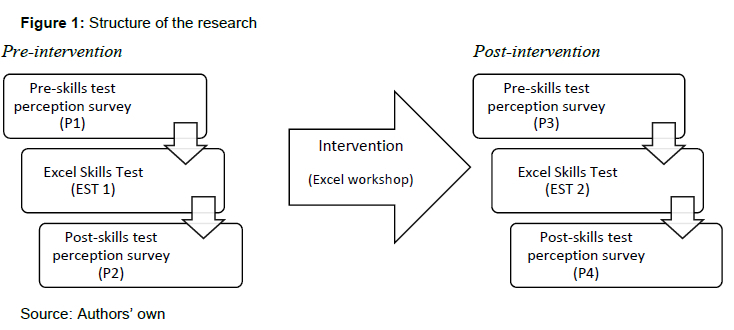
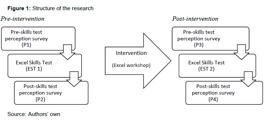
To evaluate whether students perceive themselves to be knowledgeable of MS Excel skills and whether they possess the necessary skills, the study has been conducted in two phases, each consisting of two separate parts. The study consists of a pre-intervention and post-intervention phase with each consisting of a perception survey before and after an MS Excel skills test. This is illustrated in Figure 1.
The same perception surveys and MS Excel skills tests were used for both phases for comparability. The MS Excel skills test consisted of three parts. The first part evaluated basic MS Excel skills, making use of ten multiple-choice questions. The second part, for Intermediate skills, consisted of a basic cash budgeting exercise where students had to use MS Excel functions to calculate the net present value and the internal rate of return. The third part required the students to use the MS Excel function "Solver" to determine an optimal production mix. The questions were at a third-year level to ensure the fourth-year students could complete them, ensuring the focus was on the use of MS Excel functions and not the finance problems.
The pre-intervention perception surveys (P1 and P2) and MS Excel skills test (EST 1) were executed in a computer laboratory. The MS Excel skills training intervention took place four weeks later. The post-intervention perception surveys (P3 and P4) and the second MS Excel skills test (EST 2) were conducted immediately after the intervention.
A total of 59 students attended the session before the intervention and 43 attended the session after. Only the results of the 43 students with comparable data are presented in the sections that follow.
RESULTS
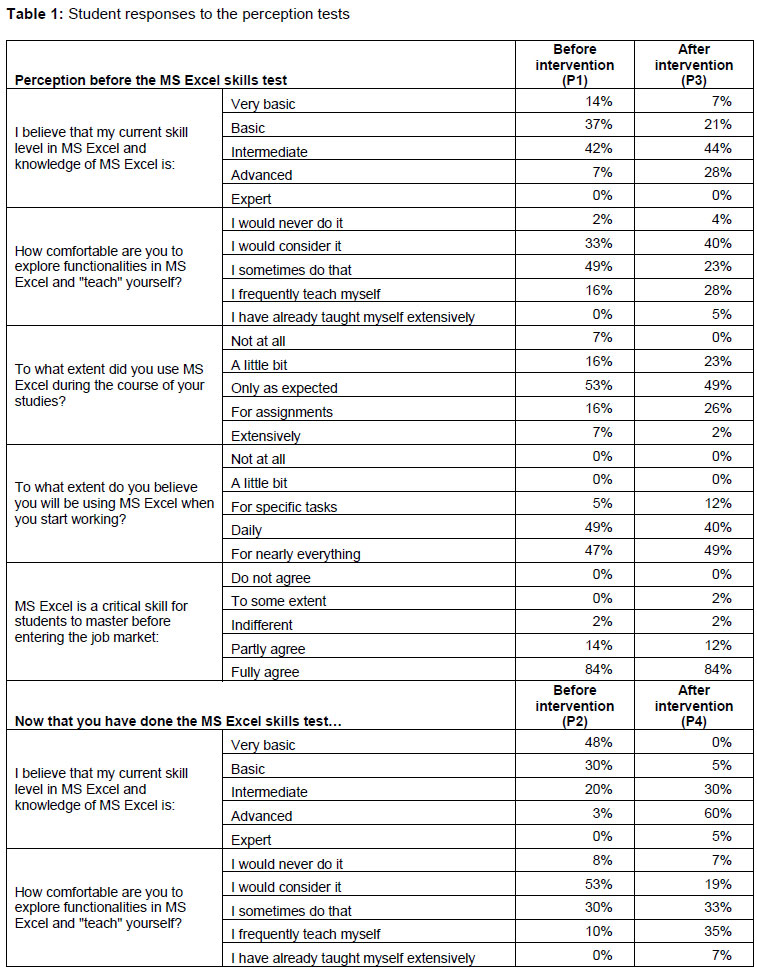
The perceptions of students regarding their MS Excel skills and how important it is in the workplace were evaluated before and after an MS Excel skills test and before and after the MS Excel training intervention. Table 1 presents the frequency percentages of students' responses.
The intervention seemingly influenced students' self-perception and self-efficacy, revealing a shift in their assessment. Before the first and second MS Excel skills tests, before and after the intervention, (P1 and P3) students' perceptions of their self-efficacy, were measured through the question "How comfortable are you to explore functionalities in MS Excel and "teach" yourself?" reveal unexpected results. Even after an intervention, students were unaware of their proficiency. However, the results after the first and second MS Excel skills tests, before and after the intervention (P2 and P4) show that students' self-efficacy increased. The students realised their proficiency and skills. Students appear to have been aware of the importance of the use of MS Excel for university tasks and in the workplace with little change to their answers in those questions.
To establish statistical significance, additional analyses are needed to explore the intervention's effect on students' perceptions and skills. To evaluate the significance of the differences between perceptions and skills tests overall, before and after the intervention, a paired-sample t-test is performed. Because the data does not satisfy the assumption of normality, bootstrapping is used (Field, 2013). The results of the analyses are presented in the tables that follow.
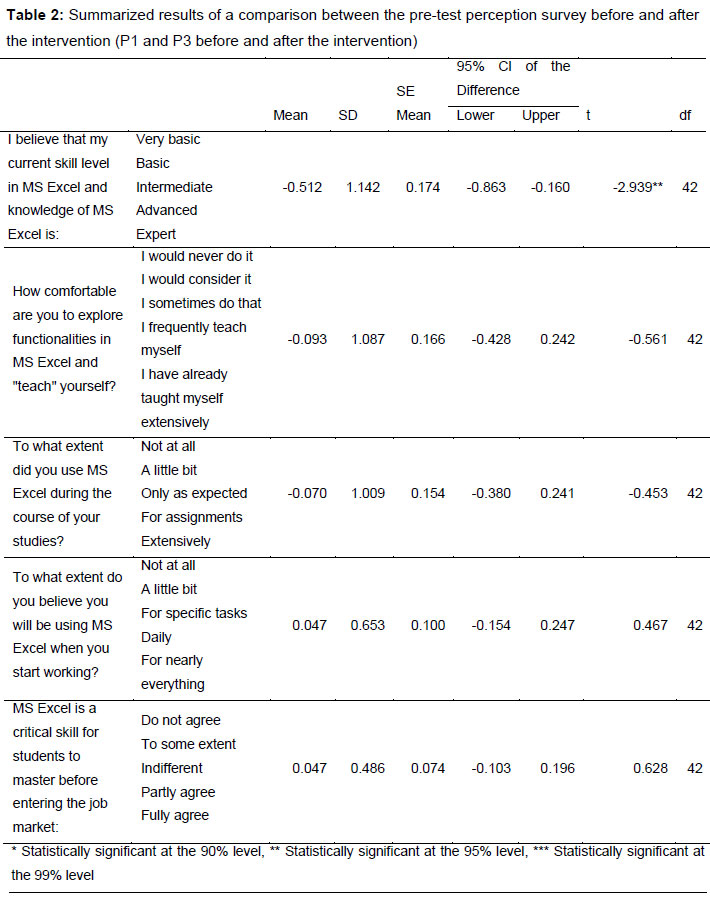
A paired-sample t-test was conducted to evaluate the students' perceptions of their MS Excel skills overall, before the MS Excel skills test, and before and after the intervention of an MS Excel training workshop (P1 and P3). The results show that only the students' perceptions of their skills and knowledge of MS Excel differed significantly before (M = 2.42, SD = .823) and after the intervention (M = 2.93, SD = .884). The students believed that their skills improved during the workshop. The difference -0.512, BCa 95% CI [-0.863, -0.160], was significant t(42) = -2.939, p = 0.005. Perceptions that were not significantly affected by the intervention relate to students' ideas about the use of MS Excel for University work and in the workplace after their studies:
• To what extent do you believe you will be using MS Excel when you start working?
• MS Excel is a critical skill for students to master before entering the job market.
The question "To what extent did you use MS Excel during the course of your studies?" will not show a statistically significant difference before and after the intervention, as the answer will not change based on an intervention. The questions on students' needs and ability to explore functionalities in MS Excel and "teach" themselves were not significant before each MS Excel skills test. Still, they became significant in the second perception survey after each MS Excel skills test.
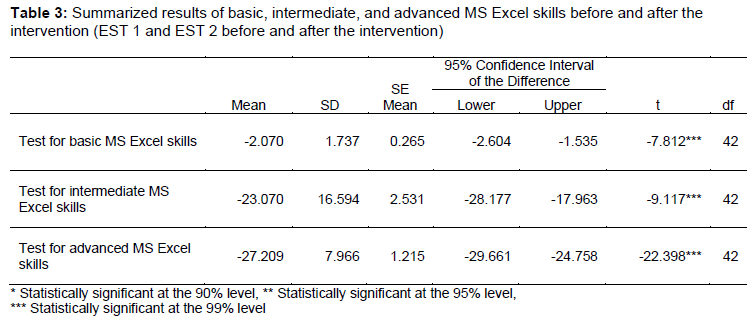
Table 3 shows the statistical results of a comparison in students' performance in the MS Excel skills test before and after the intervention. The results show that students' MS Excel skills improved remarkably after the intervention.
The paired-sample t-test shows significant differences between students' basic, intermediate, and advanced MS Excel skills before and after the intervention. Firstly, students' basic MS Excel skills before the intervention (M = 7.28, SD = 1.517) improved when it was evaluated after the intervention (M = 9.35, SD = 1.044). This difference of -2.07, BCa 95% CI [-2.064, -1.535] was significant t(42) = -7.812, p=.000. Secondly, their intermediate MS Excel skills also improved from before the intervention (M = 4.14, SD = 15.732) to after the intervention (M = 27.21, SD = 8.790). This difference of -23.070, BCa 95% CI [-28.177, -17.963] was even more significant t(42) = -9.117, p=.000. Finally, the students advanced MS Excel skills improved most from before the intervention (M = 0.00, SD = 0.000) to after the intervention (M = 27.21, SD = 7.966). This difference of -27.209, BCa 95% CI [-29.661, -24.758] was the most significant t(42) = -22.398, p=.000. This finding could be expected, as the students did not have any advanced skills before the intervention.
A detailed analysis of students' perceptions of their skills before and after the intervention and between MS Excel skills tests were performed. This relates to the two perception questions that were the same for all the perception surveys (P1, P2, P3, and P4):
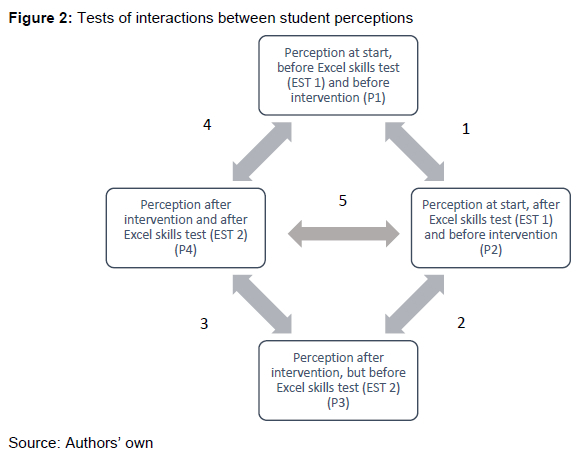
This can be graphically depicted as shown in Figure 2 (also refer to Figure 1).
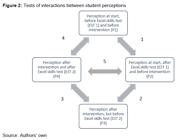
The interactions as shown in Figure 2 were evaluated through a paired samples t-test, with bootstrapping, and can be described as follows:
1. Perceptions from before the intervention, before and after the first MS Excel skills test (EST 1) - (P1 vs. P2). This sets out to see how students mistakenly believed in their own MS Excel skills and how that changed after they took a test and realized what they did not know.
• Were students aware of their lack of MS Excel skills?
• How did their perceptions change?
2. Perceptions after the first MS Excel skills test (EST 1), as well as intervention (P2 vs. P3). This sets out to see how students' confidence in their MS Excel skills improved after an intervention.
• Have students' self-competence improved after the intervention?
3. Perceptions before the second MS Excel skills test (EST 2) to after the test (P3 vs. P4). This is to establish how their perceived skills changed after the intervention and after taking an MS Excel skills test, as an indicator of self-efficacy.
• Is there a change in perceived skills after the intervention?
4. Perceptions from before the intervention, before an MS Excel skills test (EST 1), and after the intervention, after the second skills test (EST 2) (P1 vs. P4). This is to see how their perceptions changed over the entire process.
• Have the students' perceptions changed over the entire process?
5. Perceptions after the first MS Excel skills test (EST 1) to after the second MS Excel skills test (EST 2) (P2 vs. P4), as another indication of potentially increased self-efficacy
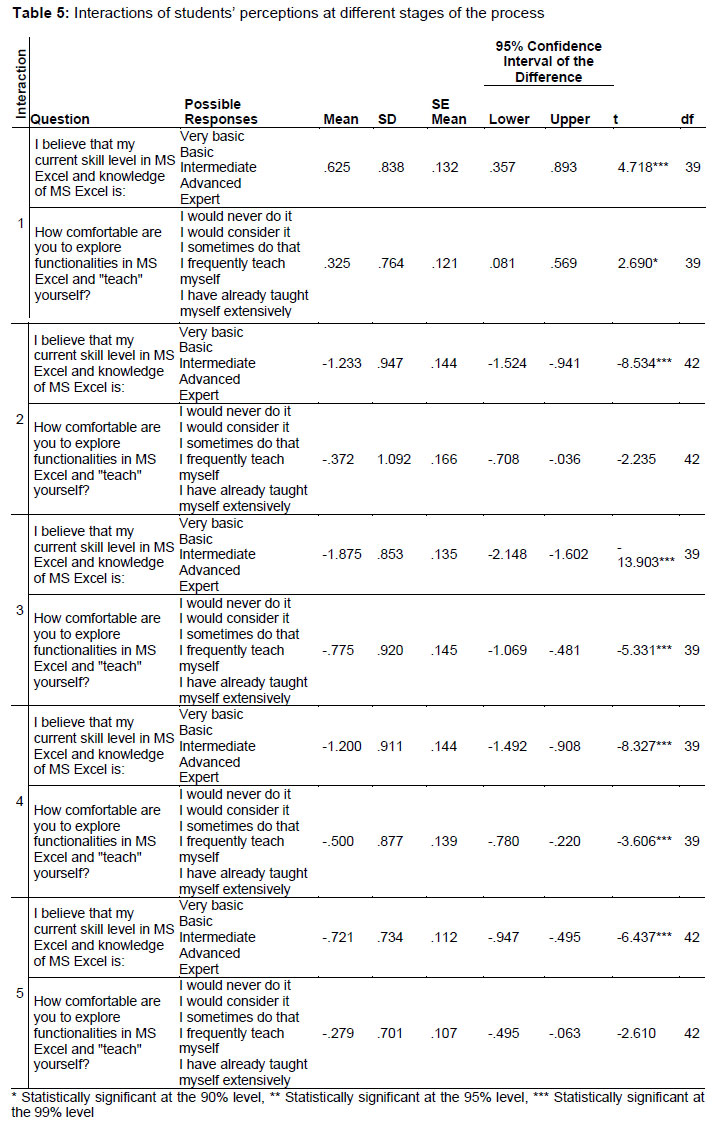
The paired-sample T-test results of these interactions are presented in Table 4.
The results, in the order of the interactions as shown in Figure 2, can be described as follows: The first interaction observes how the students' perceptions changed from before the intervention, before and after the first MS Excel skills test (EST 1) was taken (P1 vs. P2). This sets out to see whether students were aware of their lack of MS Excel skills and how that changed after they took a test and realized how much (or little) they do know. The results show a difference in students' perceptions of their skills and knowledge of MS Excel before (M =2.40, SD = .841) and after (M = 1.78, SD = .862) the first MS Excel skills test. For question 1 the difference .625, BCa 95% CI [.357, .893], was significant t(39) = 4.718, p = 0.000. For question 2 on how likely they are to explore MS Excel functionalities and "teach" themselves, there was a difference before (M = 2.75, SD = .742) and after (M = 2.42, SD = .781) the first MS Excel skills test. The difference .325, BCa 95% CI [.081, .569], was significant t(39) = 2.690, p = 0.010. The students overestimated their skills. Initially, they rated their skills as between basic and intermediate, but after the test, they realized their skills were rather between very basic and basic. It was clear though that they did not regard themselves as advanced or expert users and were keen to improve their skills through the intervention.
The second observation looks at the students' perceptions after they have taken the first MS Excel skills test (EST 1), and had an intervention, but before their skills were evaluated again (P2 vs. P3). This sets out to see how students' confidence in their perceived MS Excel skills improved after an intervention. The results show that the students' perceptions of their skills and knowledge of MS Excel differed for question 1 before (M = 2.42, SD = .823) and after (M = 3.65, SD = .650) the first MS Excel skills test and after an intervention. The difference -1.233, BCa 95% CI [-1.524, -.941], was significant t(42) = -8.534, p = 0.000. The students believed that the intervention drastically improved their skills, rating themselves as intermediate to advanced users after the intervention. However, the results for the second question on how likely they are to explore MS Excel functionalities and "teach" themselves were not statistically significant before (M = 2.79, SD = .742) and after (M = 3.16, SD = 1.045) the first MS Excel skills test and after an intervention. It seems that the intervention did not change their views on whether they would explore MS Excel functions and uses on their own.
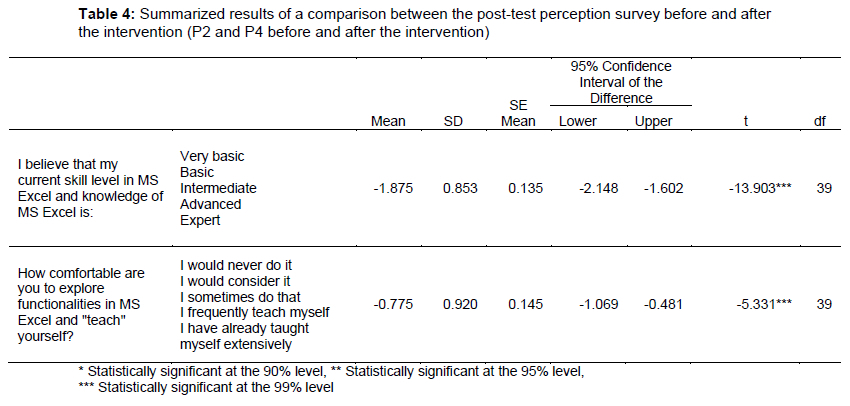
The third interaction is to see, after the intervention, how students' perceptions changed from before they took the second MS Excel skills test (EST 2) to after they took the test (P3 vs. P4). This is to establish how their perceived skills changed after the intervention and then again after taking an MS Excel skills test. For question 1 on their perceived MS Excel skills and knowledge, students' perception changed from before (M = 1.78, SD = .862) to after (M = 3.65, SD = .662) the second MS Excel skills test. The difference -1.875, BCa 95% CI [-2.148, -1.602], was significant t(39) = -13.903, p = 0.000. After the intervention, the students believed that their skills had improved. Once their improved skills were evaluated, it reflected to them that their skills indeed improved. Their untested perceptions of their improved skills were more conservative than before, they did not overestimate how much they improved. After the second skills test, it seems that the students gained more confidence in their improved skills and rated it even higher. A similar effect was observed for question 2 on their likelihood to explore MS Excel functionalities and "teach" themselves before (M = 2.42, SD = .781) and after (M = 3.20, SD = 1.067) the second MS Excel skills test. The difference -.775, BCa 95% CI [-1.069, -.481], was significant t(39) = -5.331, p = 0.000.
The fourth relationship is to see how students' perceptions changed from before the intervention, before an MS Excel skills test (EST 1), and after the intervention, after the second skills test (EST 2) (P1 vs. P4). This is to see how their perceptions changed over the entire process. For question 1 there was a difference before the intervention, before the first MS Excel skills test (M = 1.78, SD = .862), and after the intervention, after the second MS Excel skills test (M = 2.98, SD = .832). The difference -1.200, BCa 95% CI [-1.492, -.908], was significant t(39) = -8.327, p = 0.000. For question 2 on how likely they are to explore the functionalities of MS Excel and "teach" themselves, there were differences before (M = 2.42, SD = .781) and after (M = 2.93, SD = 1.047) the intervention and the MS Excel skills tests. The difference -.500, BCa 95% CI [-.780, -.220], was significant t(39) = -3.606, p = 0.001.
The final interaction relates to students' perceptions from before the intervention, but after the first MS Excel skills test (EST 1) to after the intervention, after the second MS Excel skills test (EST 2) (P2 vs. P4). For question 1 on their perceived MS Excel skills and knowledge, there was a difference before the intervention, after the first MS Excel skills test (M = 2.93, SD = .884) and after the second MS Excel skills test (M = 3.65, SD = .650). The difference -.721, BCa 95% CI [-.947, -.495], was significant t(42) = -6.437, p = 0.000. The results for the second question were different before the first MS Excel skills test (M = 2.88, SD = 1.028) and after the second MS Excel skills test (M = 3.16, SD = 1.045), but the difference was not statistically significant.
Table 5 shows how students' perceptions of their skills and their ability/willingness to explore MS Excel functionalities by themselves changed overall after the intervention. The difference before and after the intervention is significant for both questions.
A paired-sample t-test was again conducted to evaluate the students' perceptions of their MS Excel skills after the MS Excel test, before and after the intervention of the MS Excel training workshop. The results show that the students' perceptions of their skills and knowledge of MS Excel differed significantly for question 1 before (M = 1.78, SD = .862) and after (M = 3.65, SD = .662) the intervention. The difference -1.875, BCa 95% CI [-2.148, -1.602], was significant t(39) = -13.903, p = 0.000. The same effect was observed for question 2 before (M = 2.43, SD = .781) and after (M = 3.20, SD = 1.067) the intervention. The difference -0.775, BCa 95% CI [-1.069, -0.481], was significant t(39) = -5.331, p = 0.000.
CONCLUSIONS
The results show that, at the start, the students "did not know what they did not know". At the outset, the students overestimated their level of MS Excel skills. This was evidenced through an MS Excel skills test, which showed that the students were not able to do even basic functions. After the first skills test, the students realized that their MS Excel skills were not as advanced as they initially thought (P1 vs. P2).
The students attended a two-day intensive workshop as an intervention, covering basic functions to advanced financial applications in MS Excel, aiming to bridge the skills gap. As anticipated, the students' intermediate and advanced skills improved considerably, as they did not have any advanced skills before the intervention. A second skills test confirmed that the students' MS Excel skills improved after the intervention (EST 1 vs. EST 2).
Students' perception of their skills after the intervention was different from before, but it was only after the second MS Excel skills test (EST 2) that they realized that they were significantly better equipped to deal with solving financial management-related problems in MS Excel (P3 vs. P4).
It is most heartening that the overall process (P1 vs. P4) was statistically significant, indicating that the students obtained more confidence in their skills and knowledge (question 1) and also became better equipped to "help themselves" to learn more MS Excel functionalities (question 2). There was thus a clear development of self-efficacy, even with only a short two-day workshop.
RECOMMENDATIONSMS Excel is vital in the workplace, yet many students lack sufficient skills. According to research by Balik (2009), MacDougall and Follows (2006), as well as Bailey and Ragland (2022), initial training in the first year ought to progress to integrating MS Excel with subject-related skills in later courses. It is suggested that this integration should span over various finance and accounting modules, incorporating MS Excel-based work, with selected homework and assignments completed and marked in MS Excel. This supplementary approach could enhance students' proficiency and application of MS Excel functions, as well as long-term retention of these skills. While this study did not assess spreadsheet self-efficacy, employing social cognitive theory can aid in developing methods to enhance students' MS Excel skills. Progressive integration fosters success, feedback, and self-efficacy, cultivating proficient graduates and confident, lifelong learners (Bandura, 1977). Despite potential challenges for instructors lacking MS Excel skills, guidelines on constructing well-formatted MS Excel answers, like Balik's (2009) Excel Best Practices, can assist in this process.
The implications of this study, rooted in a South African context, hold relevance for educators worldwide. MS Excel and other business intelligence and analytics skills are lacking globally. The emphasis on progressive integration and the application of social cognitive theory transcends geographical boundaries, providing valuable insights for educators globally seeking effective strategies for enhancing students' MS Excel (and other technology) skills in various academic and business settings.
REFERENCES
LITERATURE REVIEW
- Aryanti, C., and D. Adhariani. (2020). "Students' perceptions and expectation gap on the skills and knowledge of accounting graduates". The Journal of Asian Finance, Economics and Business (JAFEB), 7(9), 649-657.
- Bailey, C., and L. Ragland. (2022). "Developing students' skill-based competencies: A strategic learning approach". The Accounting Educators' Journal, 32.
- Balik, R. J. (2009). "MS Excel best practices". Managerial Finance, 35(5), 410-426.
- Bandura, A. (1977). "Self-efficacy: toward a unifying theory of behavioral change". Psychological review, 84(2), 191.
- Bandura, A. (1981). "Self-referent thought: A developmental analysis of self-efficacy". In J. H. Flavell and L. Ross (Eds.), Social cognitive development: Frontiers and possible futures. Cambridge: Cambridge University Press.
- Bandura, A. (2010). "Self-efficacy". The Corsini Encyclopedia of Psychology, 1-3.
-
Burning Glass Technologies. (2015). Crunched by the Numbers: The Digital Skills Gap in the Workforce. Available at: https://www.buming-glass.com/research-project/digital-skills-gap/
» https://www.buming-glass.com/research-project/digital-skills-gap/ - Carini, R. M., G. D. Kuh, and S. P. Klein. (2006). "Student engagement and student learning: Testing the linkages". Research in Higher Education, 47(1), 1-32.
- Cory, S. N., and K. A. Pruske. (2012). "Necessary skills for Accounting Graduates: An exploratory study to determine what the profession wants". ASBBS Proceedings, 19(1), 208-218.
- Daff, L. (2021). "Employers' perspectives of accounting graduates and their world of work: Software use and ICT competencies". Accounting Education, 30(5), 495-524.
- Davis, P. (1999). "How undergraduates learn computer skills: Results of a survey and focus group". Technological Horizons in Education Journal, 26(9), 68-71.
- Diamant, A. (2024). "Introducing prescriptive and predictive analytics to MBA students with Microsoft Excel". INFORMS Transactions on Education, 24(2), 152-174.
- Doe, M., Annan, E. M., Ahiale, F. K. A., & Robert, A. (2016). Lack of competence in using Microsoft Excel by accounting students. Global Journal of Commerce & Management Perspective, 5(4), 3942.
- Field, A. (2013). Discovering statistics using IBM SPSS statistics. Sage.
- Formby, S. K., D. Medlin and V. B. Ellington. (2017). "Microsoft MS Excel ®: is it an important job skill for college graduates?". Information Systems Education Journal, 15(3), 55-63.
- Grant, D. M., Malloy, A. D., & Murphy, M. C. (2009). A comparison of student perceptions of their computer skills to their actual abilities. Journal of Information Technology Education: Research, 8(1), 141-160.
- Hardin, E. E., Gibbons, M. M., Cook, K. D., Sexton, K., & Bagwell, L. (2021). Development and validation of a short form of the College-Going Self-Efficacy Scale. Journal of career assessment, 29(2), 303-318.
- Hermawan, A., W. Achmad and Y. Yulianah. (2022). "The role of information and communication technology in accounting education in the digital age". Research and Development Journal of Education, 8(2), 926-933.
- Igbaria, M., and J. livari. (1995). "The effects of self-efficacy on computer usage". Omega International Journal of Management Science, 23(6), 587-605.
- Kinzie, M. B., Delcourt, M. A., & Powers, S. M. (1994). Computer technologies: Attitudes and self-efficacy across undergraduate disciplines. Research in higher education, 35, 745-768.
- MacDougall, S. L. and S. B. Follows. (2006). "Modeling-building in MS Excel as Pedagogy for the Fundamentals of Corporate Finance". Journal of Financial Education, 32(1) 55-71.
- McCann, M., and J. A. Russon. (2019). "Active financial analysis: Stimulating engagement using Bloomberg for introductory finance students". International Review of Economics Education, 30, 100153.
- McKnight, K., O'Malley, K., Ruzic, R., Horsley, M. K., Franey, J. J., & Bassett, K. (2016). Teaching in a digital age: How educators use technology to improve student learning. Journal of research on technology in education, 48(3), 194-211.
- Moos, D. C., and R. Azevedo. (2009). "Learning with computer-based learning environments: A literature review of computer self-efficacy". Review of Educational Research, 79(2), 576-600.
-
Quinto II, Emmanuel J. (2022). How Technology Has Changed the Field of Accounting. In BSU Honors Program Theses and Projects. Item 558. Available at: https://vc.bridgew.edu/honors_proj/558
» https://vc.bridgew.edu/honors_proj/558 - Ragland, L., and U. R. Ramachandran. (2014). "Towards an understanding of MS Excel functional skills needed for a career in public accounting: Perceptions from public accountants and accounting students". Journal of Accounting Education, 32(2), 113-129.
- Ramachandran, U.R., and L. Ragland. (2016). "MS Excel in the accounting curriculum: perceptions from accounting professors". Accounting Education, 25(2), 139-166.
-
Schmidt, P. J., J. Riley, and K. Swanson Church. (2020)." Investigating accountants' resistance to move beyond Excel and adopt new data analytics technology". Accounting Horizons, 34(4), 165-180. https://doi.org/10.2308/HORIZONS-19-154
» https://doi.org/10.2308/HORIZONS-19-154 - Singh, A., V. Bhadauria, A. Jain, and A. Gurung. (2013). "Role of gender, self-efficacy, anxiety and testing formats in learning spreadsheets". Computers in Human Behavior, 29(3), 739-746
- Slayter, E., and L. M. Higgins. (2018) "Hands-On Learning: A Problem-Based Approach to Teaching Microsoft MS Excel". College Teaching, 66(1), 31-33.
- Tickle, L., T. Kyng, and L. N. Wood. (2014). "The role of universities in preparing graduates to use software in the financial services workplace". International Journal of Mathematical Education in Science and Technology, 45(2), 200-213.
- Wessels, P. L. (2007). "An analysis of the current IT education offered to accounting students at South African universities". South African Journal of Accounting Research, 21(1), 103-126.
- Yu, S., N. T. Churyk, and A. Chang. (2013). "Are students ready for their future accounting careers? Insights from observed perception gaps among employers, interns, and alumni". Global Perspectives on Accounting Education, 10, 1.
- Zhang, C. (2014). "Incorporating powerful MS Excel tools into finance teaching". Journal of Financial Education, 87-113.